
Tools and providers
Part of Social media ad design tools for shoppable ads
Social media ad design tools for shoppable ads
A guide to social media ad design tools for Instagram Shopping and TikTok Shop, with practical UK advertising disclosure and data protection checks.
What to take away
- Tool choice usually follows one jobgetting a single product asset to work across Instagram Shopping, Facebook feed and TikTok Shop without redrawing it each time.
- Canva, Figma and Adobe Express cover layout. Smartly, Creatopy and Celtra handle feed-linked variants.
- Instagram Shopping and TikTok Shop both expect a product feed, so Channable or DataFeedWatch often sit on the shortlist.
- For social media marketing, check the CAP Codemake commercial content obviously identifiable (for example, “Ad” or “Advertisement”) and substantiate objective claims. The BCAP Code applies to broadcast ads.
- Customer-list uploads to Meta or TikTok need a UK GDPR and Data Protection Act 2018 review. Check lawful basis, privacy information, data minimisation and whether PECR requires consent. The ICO's direct marketing guidance is a starting point.
- Choose on the format you must ship every week, not on the longest feature list.
Why UK social commerce formats change the design brief
A Facebook feed placement and a TikTok Shop video are not the same canvas. Instagram Shopping tags a product inside the frame. TikTok Shop reserves a card and caption zone that your text must avoid.
Placement safe areas compared
Instagram Shopping
- Product tag
- Inside frame
- Caption area
- Below image
- Text to avoid
- Tag overlap
- Data source
- Product feed
TikTok Shop
- Product tag
- Card zone
- Caption area
- Reserved
- Text to avoid
- Card and caption
- Data source
- Product feed
Safe areas matter more than style. A layout that looks tidy in Canva or Figma can lose its headline behind a product card once it runs.
Product feeds add a second source of truth. Price, availability and product name come from the feed. A design tool that ignores feeds leaves someone retyping them by hand.
What each job needs from a tool
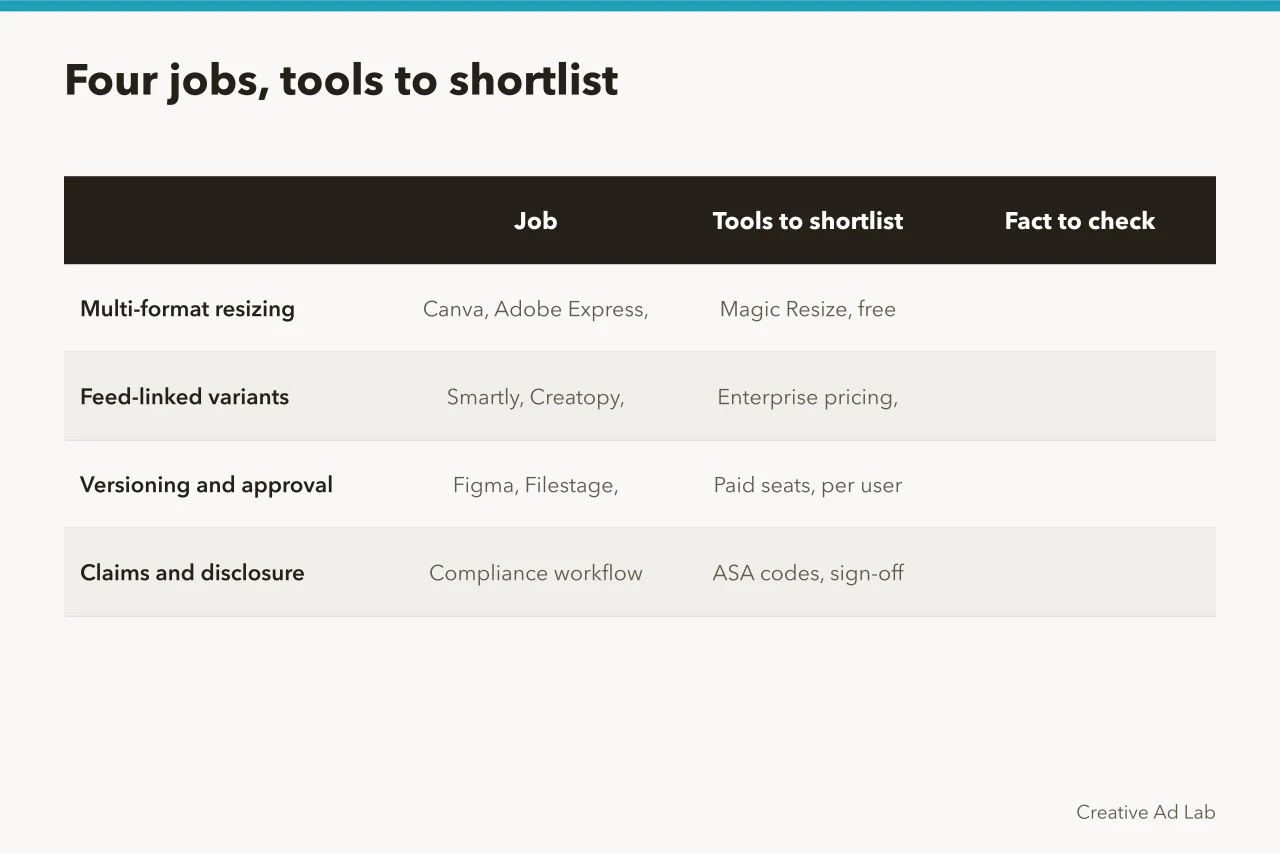
The four jobs below rarely live in one product. Most UK teams run a design tool plus one automation layer. Comparing products on the same specimen, as this product comparison method sets out, is quicker than scoring feature grids.
What each job needs
What to look for
- Multi-format resizing
- Templates locked to aspect ratios, text kept inside safe zones
- Feed-linked variants
- Connection to a Meta or TikTok catalogue, automatic price and name
- Versioning and approval
- Named versions, an audit trail, one approver per asset
- Claims and disclosure
- A checklist tied to the ASA codes, signed off before launch
Tools to consider
- Multi-format resizing
- Canva, Figma, Adobe Express
- Feed-linked variants
- Smartly, Creatopy, Celtra
- Versioning and approval
- Frontify, Bynder, Brandfolder
- Claims and disclosure
- Compliance step
Canva has a free tier and paid Pro subscription, with Brand Kit and Magic Resize. Figma has a free Starter plan and paid seats per editor. Adobe Express has a free plan and Premium subscription.
Smartly is enterprise creative automation with pricing on request. It connects to Meta and TikTok ad accounts. Creatopy has free and paid plans. Celtra is enterprise creative management with pricing on request.
Channable and DataFeedWatch manage product feeds and charge by feed size or SKU count.
A five-step sequence for a shoppable ad set
- Fix the product feed first in Channable or DataFeedWatch. Agree who owns price and stock data before anyone opens a design file.
- Build one master layout in Canva, Figma or Adobe Express at the largest aspect ratio you need.
- Generate the smaller formats, then check each one by eye for clipped text and hidden product tags.
- Check disclosure and claims against the CAP Code (and the BCAP Code for broadcast advertising): use a clear “Ad” or “Advertisement” label where commercial intent is not otherwise obvious, and hold evidence for objective claims.
- Record which version ran, on which placement, and for how long.
The checks that decide whether a shoppable ad runs
The ASA administers the CAP Code for non-broadcast marketing communications; the BCAP Code covers broadcast advertising. For social media ads, CAP Code rule 2.1 requires marketing communications to be obviously identifiable as such. If commercial intent is not otherwise clear, rule 2.3 requires it to be made clear. Use a prominent label such as “Ad” or “Advertisement”; a product tag alone may not make the commercial nature obvious.
For objective claims, keep documentary evidence before publication (CAP Code rule 3.7). Check that qualifications are clear and that price and availability claims match the current product feed. Canva and Figma can hold a disclosure line, but they cannot judge a claim.
Pricing and urgency claims attract Competition and Markets Authority attention. The CMA publishes its cases and projects on GOV.UK.
Uploading a customer list to Meta or TikTok for audience building means handling personal data. The UK framework includes the UK GDPR and Data Protection Act 2018. Before an upload, document a lawful basis, check that your privacy information explains the audience-building and data sharing, and limit the upload to the fields needed. Check whether PECR applies to the marketing activity and obtain valid consent where it requires it; honour objections. The ICO's direct marketing and PECR guidance is a starting point.
Vetting a vendor is its own exercise. Use the guide to vetting ad creative compliance software and ask: can it keep approved disclosures in templates; preserve sign-off and version history; let approvers review evidence for claims; check output across required placements and safe areas; and explain how it handles customer data and platform permissions?
Choosing between a design tool and a feed-driven platform
If two people make fewer than twenty assets a month, a design subscription with saved templates is enough. Feed automation starts to pay when a catalogue changes weekly and every change must reach six placements.
Design tool or feed-driven platform
Sensible starting point
- One designer, fewer than twenty assets a month
- Design tool with saved brand templates
- Catalogue prices change weekly
- Feed-linked creative automation
- Six placements, one approver
- Workflow tool with named versions
- Regulated claims, such as health or finance
- Compliance checklist plus human sign-off
Example tools
- One designer, fewer than twenty assets a month
- Canva Pro, Adobe Express
- Catalogue prices change weekly
- Smartly, Creatopy
- Six placements, one approver
- Frontify, Bynder
- Regulated claims, such as health or finance
- ASA codes, ICO guidance
The decision turns on change frequency, not team size. A ten-person team shipping ten stable assets a quarter needs less tooling than a two-person team reacting to daily stock movements.
Common questions
Do UK ecommerce teams need separate tools for Instagram and TikTok?
Not necessarily. One design tool with locked templates will cover both formats if it exports every aspect ratio you need. A second tool earns its place when a product feed generates the variants. Smartly and Creatopy are built for that second job.
Can design software check ASA compliance for me?
No. Software can hold a checklist and block a launch. The judgement about whether a claim misleads sits with a person. Canva and Figma can store the disclosure line. They cannot approve it. Where a claim has been ruled on before, the ruling itself is the better guide.
What drives the price of these tools?
Pricing usually follows seats or output volume rather than campaign count. Canva Pro and Adobe Express charge per user. Smartly and Celtra price on request. Channable and DataFeedWatch charge by feed size or SKU count.
Do product feeds contain personal data?
Product data is not personal data. The customer lists used to build audiences are. Keep them separate in the workflow so that any upload of customer records is reviewed before it leaves your systems.